Claude Code leaked 31,088 secrets: how to check your repos

Summary
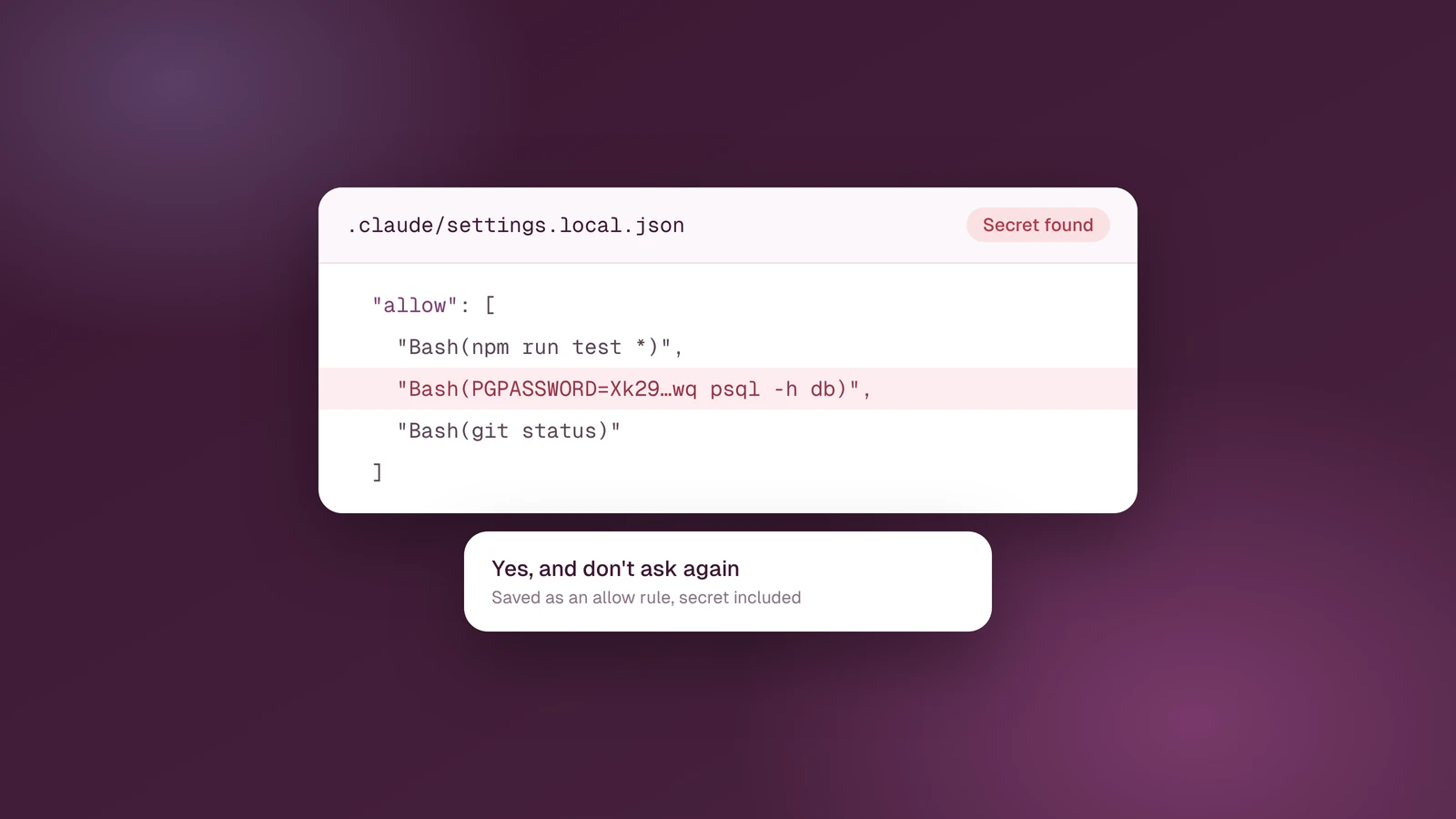
Claude Code's "Yes, and don't ask again" option saves the approved command as a permission rule in .claude/settings.local.json, and that includes any API key or password typed into the command.
Claude Code keeps the file out of git only on the machine where it created it. To check your repos, search tracked files and git history for .claude/settings.local.json, rotate anything you find, and add .claude/ to .gitignore and .dockerignore.
GitGuardian found 31,088 distinct secrets in these files across 23,276 public GitHub repositories, and 5,343 were still valid when detected.
This guide explains why the file leaks, how to check your own repos and images, and how to stop approved commands from carrying secrets in the first place.
What happened with Claude Code's "don't ask again"?
When Claude Code asks to run a command and you choose "Yes, and don't ask again", it saves an allow rule to .claude/settings.local.json at the root of the repository.
The rule is the command string itself. If that command was a curl call with an API key in a header, or a psql command with a password in the connection string, the key is now stored in a file in your project.
GitGuardian scanned public GitHub from January 2025 to November 2026 and published the results on November 9.
Its researchers counted 31,088 distinct secrets in settings.local.json files, and 17% were valid when they checked.
CSO Online and InfoQ covered the findings, and InfoQ reported a second study from Apiiro that found the same pattern.
The commands that carried secrets were mostly ordinary. In GitGuardian's sample, half were curl calls, 15% set a variable such as PGPASSWORD or DATABASE_URL before a command, and smaller shares were database clients and one-line scripts.
Valid finds included 1,955 Postgres connection strings, 941 Google API keys and 292 SSH passwords.
Why doesn't .gitignore protect settings.local.json?
Claude Code does try to keep the file out of git. The first time it writes the file in a repository that doesn't already ignore it, it adds the path to your global git excludes file.
That protects the developer on that machine. It doesn't change the repository's own .gitignore, so the protection doesn't travel with the code.
That leaves several ordinary ways for the file to end up in a commit or an image:
The Docker case surprises people most. A COPY instruction takes files from the build context, not from the git index, so a file git ignores still ships unless .dockerignore excludes it.
GitGuardian found 613 distinct secrets from these files in public Docker Hub images, across 543 image repositories, and one valid Cloudflare token sat in 559 tags of a single image.
How do you check your repos for leaked Claude Code secrets?
Start with the repos where people use Claude Code most. A first pass takes a few minutes per repo:
- Check what's tracked now. Run git ls-files | grep .claude/ to see whether settings.local.json, settings.json or any other agent file is committed.
- Check history. Run git log --all --oneline -- .claude/settings.local.json. A file that was committed once and deleted later is still in history and in every existing clone.
- Read the allow rules. Open each version you find and look through the permissions.allow list and any env block. GitGuardian found every secret it could place in one of those two spots.
- Don't rely on one scanner. Apiiro reported that gitleaks and TruffleHog missed some of these secrets because they sat inside shell commands. Search for strings like Bearer, PGPASSWORD=, postgres:// and api_key as well.
- Check your images. Look for .claude/ in any image built from a working tree, and check .dockerignore in each repo that has a Dockerfile.
- Check the other agent files. GitGuardian also found 6,155 distinct secrets in committed CLAUDE.md files and 1,064 tokens in Codex auth.json files. Treat .claude/, .cursor/, .codex/, .mcp.json and CLAUDE.md like .env.
What should you do if you find a secret?
Rotate it first. GitHub's guidance is direct: if a secret was committed, then "as a first step you need to revoke and/or rotate that secret."
Once it's rotated, the copy in git can't be used, which matters because you can't remove it from other people's clones or from forks.
Then clean up the repository:
- Stop tracking the file. Run git rm --cached .claude/settings.local.json, and add .claude/settings.local.json to the repository's .gitignore so every clone ignores it.
- Exclude it from images. Add .claude/ to .dockerignore, rebuild, and delete or replace image tags that contain it.
- Rewrite history if you need to. For a public repo, or one shared widely, use git-filter-repo with the --sensitive-data-removal flag (version 2.47 or later) to remove the file from history, then follow GitHub's steps for cached views and pull requests.
- Remove the rule. Delete the allow rule that holds the secret, either in the file or through /permissions, so the next commit doesn't bring it back.
How do you keep secrets out of approved commands?
The fix is to keep the secret out of the command text, so there's nothing for an allow rule to capture.
- Reference secrets as variables. Write curl -H "Authorization: Bearer $API_TOKEN" rather than pasting the token. The saved rule then holds the variable name, not the value.
- Keep secrets in a secret manager. The OWASP Secrets Management Cheat Sheet recommends central storage, automated rotation and secrets detection at the developer level before commit or PR.
- Write narrow rules on purpose. A rule like Bash(npm run test *) is safer than approving whatever command happens to be on screen. Anthropic's docs also warn that patterns that try to constrain command arguments are fragile.
- Block reads of secret files. Add deny rules such as Read(./.env) and Read(./.env.*). Deny rules only cover Claude's built-in file tools, so use the sandbox for OS-level enforcement.
- Turn on push protection. GitHub push protection blocks pushes that contain recognized secrets before they reach the repository.
- Ship a repo-level ignore. Add .claude/settings.local.json to the .gitignore and .claude/ to the .dockerignore in your project templates, so new repos start safe.
Is this only a Claude Code problem?
No. Any coding agent that stores approvals, transcripts or credentials in the project folder creates the same risk, which is why GitGuardian also found secrets in Codex and other agent files. Agent logs carry the same risk.
Cursor's incident update said a small number of stored coding agent traces "contained credentials that had not been redacted", and the attacker used those credentials to reach some of Cursor's SaaS tools.
The pattern is the same in each case. Agents make it easy to put a working credential into a command or a log, and that text ends up somewhere it wasn't meant to go.
A review step that looks at every change, including config files nobody thinks of as code, is what catches it.
We cover that review in more depth in our guide to security reviewing pull requests written by AI coding agents.
How does Dam Secure help keep secrets out of agent config?
Dam Secure works at two points: before the code is written, and when it reaches a pull request.
PR Security Reviews check every pull request against how your codebase works, including agent config files like .claude/settings.local.json and CLAUDE.md.
Cryptography and secrets is one of the nine lenses each review runs, so a committed connection string or API key is flagged on the PR in under two minutes, with the fix. Findings sync to Linear and Slack and close when the fix lands.
Managed Security Context gives your coding agents security context for your codebase in the formats Claude Code, Cursor, Codex and GitHub Copilot already read, including rules such as no hardcoded secrets.
It's generated from your codebase and the issues your team has already fixed, then raised as a PR for your team to review, so agents reference secrets as variables in the first place.
 dam-securebotreviewed in 1m 12s
FAQ
Is .claude/settings.local.json safe to commit?
No. It's meant for one developer's personal settings, and "Yes, and don't ask again" writes approved commands into it, including any secrets in those commands. Add it to the repository's .gitignore so every clone ignores it.
Does Claude Code add settings.local.json to .gitignore?
It adds the file to your global git excludes file the first time it writes it in a repository, which protects that machine only. It doesn't edit the repository's .gitignore, so other clones, hand-created files and Docker builds aren't covered.
How do I remove a secret from Claude Code's settings?
Rotate the secret first, then delete the allow rule that holds it, either in .claude/settings.local.json or through /permissions. If the file was ever committed, stop tracking it with git rm --cached and rewrite history for public or widely shared repos.
How does Claude Code handle secrets?
Claude Code saves approved commands as written, so any secret in the command ends up in the saved rule. Keep secrets in environment variables or a secret manager, reference them by name in commands, and add deny rules for files like .env.
Want to see Dam Secure review your team's PRs? Speak to our team.