Are Claude Code mods safe? What your team should lock down

Summary
Claude Code mods are safe when you control which ones load. Mods are on by default from Claude Code v2.1.287, and they run unsandboxed inside Claude Code with the developer's own access. A mod can read keys, rewrite tool calls and approve commands. Set allowManagedModsOnly in managed settings and review each mod the way you review a dependency.
Anthropic launched mods on October 1, and ten days later one community list already tracked 3,382 of them. Most are useful: context meters, CI panes and confirmation prompts before a production deploy.
The catch is that a mod is code from its publisher, running with everything Claude Code can reach, and on most teams nobody has decided who gets to install one. This guide covers what mods can access, what Anthropic's built-in guard does, and the settings and review steps that keep mods useful without handing out that access.
What are Claude Code mods?
A mod is a Claude Code plugin made of JavaScript or TypeScript event handlers that run inside Claude Code's own process. A settings hook runs a shell command at a fixed point. A mod handler can observe an event, rewrite it, or answer it in place of Claude Code. Mods can draw panes and buttons, add slash commands, hold or replace a tool call, send a request to a different model, and approve or deny a permission request.
Mods went from an early-access flag to on by default in 29 days. Anthropic's admin docs are direct about it: "Mods are on by default in Claude Code v2.1.287 and later." Some of Claude Code's own features now ship as built-in mods, including /diff and AGENTS.md support, and each of those has its own on and off switch.
What can a Claude Code mod access?
Anthropic's launch post says it plainly: "Mods run with the same access to your machine as Claude Code itself." In practice that covers four things a security or engineering lead cares about:
- Files and processes. A mod can read and write files and start processes through its own API, with the developer's user permissions.
- Secrets. A mod can read environment variables and Claude Code settings, which is where API keys and tokens usually live.
- The network. A mod can make HTTP requests, so anything it reads can leave the machine.
- Approvals. A mod that answers permission checks can approve a call that an ask rule would have prompted for. In auto mode, a call a mod approves runs without a classifier check.
Two points surprise most teams. First, the sandbox doesn't apply. Anthropic's docs say "Mods aren't sandboxed." The sandbox isolates only the Bash commands Claude runs, so a process a mod starts runs outside it. Second, deny rules govern Claude's tools, not the mod. A deny rule on Read(.env) stops Claude reading the file, but it doesn't stop a mod reading the same file through its own file API.
Are Claude Code mods safe to install?
None of the mod security write-ups we reviewed documents a malicious mod in the wild yet. The attacks published so far are researchers' own proofs of concept. That's good news, but the pattern is familiar from every extension marketplace developers already use.
In August, Open VSX removed 77 extensions that impersonated legitimate developer tools, and 19 of them sent developer, Git repository and CI metadata to an outside server. Earlier this year, the GlassWorm campaign pushed malicious updates to four established extensions with more than 22,000 combined downloads. A mod you reviewed in October can change in November.
The wider data points the same way. Verizon's 2026 Data Breach Investigations Report found that breaches involving a third party made up 48% of all breaches. The OWASP Top 10 for Agentic Applications lists agentic supply chain vulnerabilities as ASI04, noting how easily runtime components can be poisoned.
The guard that limits mods is also new code. In the eight days after launch, Claude Code shipped fixes for several ways a mod could get past deny rules or another mod's guard hook, across versions 2.1.289 to 2.1.296. Keep Claude Code current on every machine, and rely on managed settings rather than on developers configuring things themselves.
What does the sec-default guard protect?
Claude Code includes a built-in mod called sec-default that loads first and limits what user-installed mods can do. It loads only when the machine has managed settings or the developer is signed in on a Team or Enterprise plan. Developers using an API key, Bedrock, Google Cloud or Foundry get the guard only on a machine with managed settings. Once it loads, developers can't turn it off.
Where it loads, the guard protects what your organization manages: managed hooks, the system prompt, managed CLAUDE.md files, settings reads and managed MCP tools. Deny rules and managed PreToolUse hooks win over user mods. Anthropic's docs are also clear about the limit: "The guard adds no other restrictions." A mod's own file and process calls still run, and a mod can still approve calls that an ask rule would prompt for.
So the guard keeps user mods from overriding your policy, but it doesn't decide which mods are allowed to load. That takes one more setting.
How do you lock down Claude Code mods for your team?
The controls live in managed settings, which take precedence over user, project and local settings. Here are the steps in order:
- Deploy a managed settings file. Save managed-settings.json in the system directory: /Library/Application Support/ClaudeCode/ on macOS, /etc/claude-code/ on Linux and WSL, or C:\Program Files\ClaudeCode\ on Windows. MDM profiles and the claude.ai admin console work too. This step alone loads the guard on every machine.
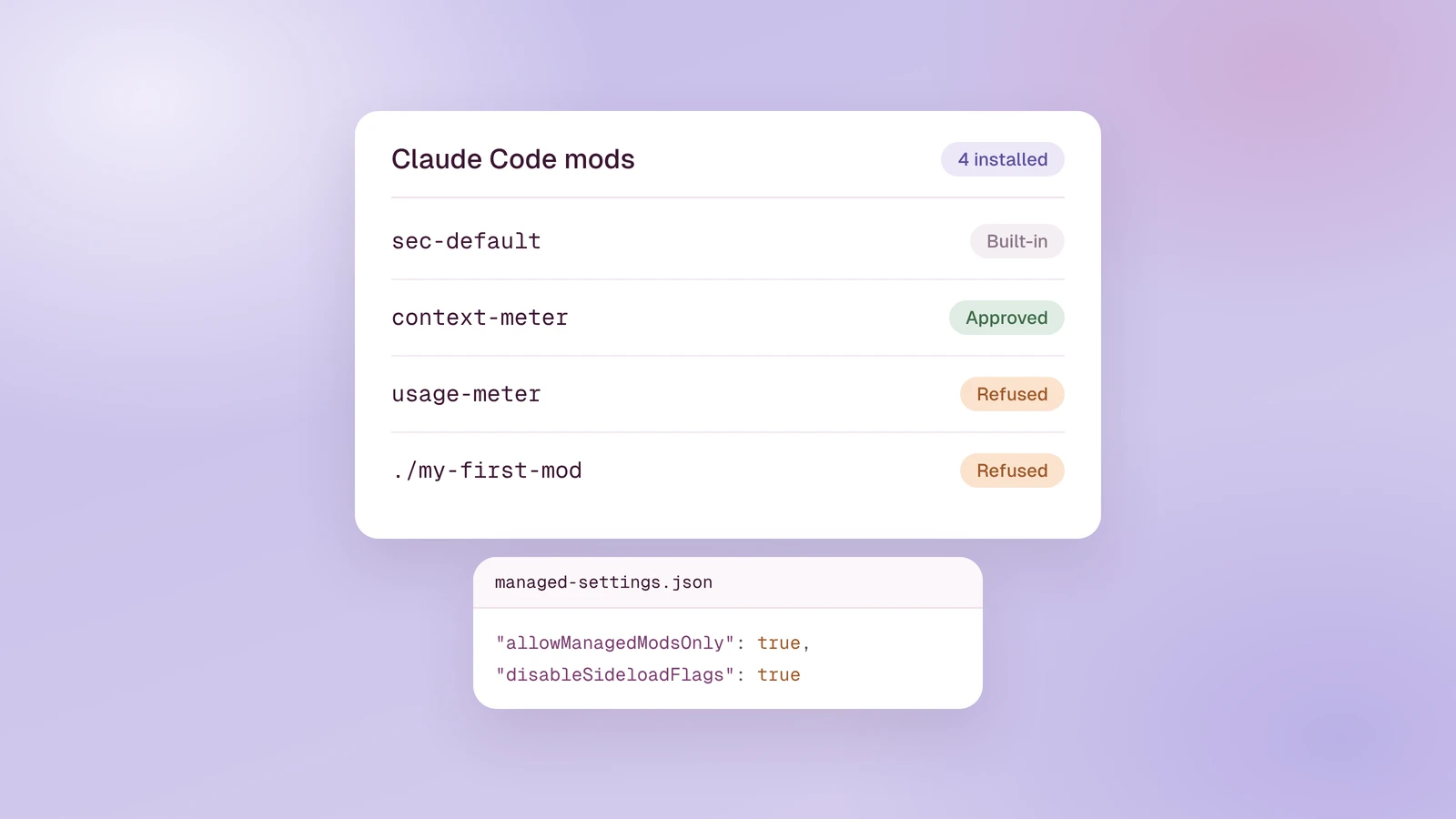
- Allow only managed mods. Set allowManagedModsOnly to true. It isn't a top-level key: it goes under pluginConfigs, keyed by cc-plugin-sec-default@builtin. With it on, Claude Code refuses user-installed mods, mods loaded with --plugin-dir and mods Claude writes during a session. Built-in and organization mods still load.
- Block sideloading. Set disableSideloadFlags so Claude Code rejects --plugin-dir and --plugin-url at startup.
- Host approved mods in your own marketplace. Put reviewed mods in a directory marketplace you control, register it with extraKnownMarketplaces, and turn each one on with enabledPlugins. Use strictKnownMarketplaces to limit where plugins can come from.
- Keep the guard first. If you load your own policy mod with prependPlugins, list sec-default@builtin as well, or the guard drops out.
- Leave allowModsToOverrideDenyRules unset. Setting it to true lets a user mod approve calls your deny rules block.
- Check that it works. On a test machine, run claude --plugin-dir ./first-mod. With allowManagedModsOnly set, the mod's hooks don't run and the guard message names the mod it refused.
{
  "pluginConfigs": {
    "cc-plugin-sec-default@builtin": {
      "options": { "allowManagedModsOnly": true }
    }
  },
  "disableSideloadFlags": true,
  "extraKnownMarketplaces": {
    "acme-tools": { "source": {
      "source": "directory",
      "path": "/opt/acme/claude-plugins" } }
  },
  "enabledPlugins": { "acme-guard@acme-tools": true },
  "prependPlugins": [
    "acme-guard@acme-tools", "sec-default@builtin"
  ]
}
Built-in mods aren't affected by allowManagedModsOnly, --safe-mode or disableAllHooks, and each one has its own switch in /plugin. If you need a hard stop while you set this up, disableAllHooks in managed settings turns off mods in every installed plugin, along with settings hooks and custom status lines.
How should you review a mod before approving it?
Treat a mod like a new dependency that can run shell commands. A short review you actually run beats a long one nobody follows.
- List what it calls. claude plugin validate ./some-mod prints the mod's hooks and the API calls it makes, without running any code. A context meter needs to draw a pane. It has no reason to read environment variables, make HTTP requests or approve tool calls.
- Read the code behind every sensitive call. File reads, process starts, network calls and permission approvals each need a reason you can state in one sentence.
- Pin the version. Copy the reviewed version into your marketplace directory rather than pointing at an upstream source that can change.
- Review again on every update. Compare the validate output between versions. A new call means a new review.
- Give the marketplace an owner. Keep the marketplace directory in a repo with required reviewers, so adding or updating a mod goes through a pull request like any other change.
Why do pull requests still matter once mods are locked down?
Managed settings control what runs on a developer's machine. They don't tell you what a session produced. A mod can rewrite prompts and tool calls, machines that aren't managed yet behave differently, and many teams run more than one coding agent. The pull request is the one place every change lands, whichever agent or configuration wrote it.
That makes PR review the backstop for mods in two ways. It covers the code sessions write, and it covers changes to the mods themselves once your marketplace lives in a repo. A PR that adds a mod which reads .env and posts to an outside host deserves the same scrutiny as a PR that adds a new outbound API call. For a broader checklist across Claude Code, Cursor and Codex, see our guide to enforcing security policies on AI coding agents.
How does Dam Secure help with Claude Code mods?
Dam Secure doesn't manage Claude Code settings or decide which mods load. Managed settings do that. We cover the two layers on either side of it.
PR Security Reviews check every pull request against how your codebase actually works and post findings in under two minutes. Each review runs nine lenses, including AI and agent security and cryptography and secrets. A PR that adds a mod which reads environment variables and sends them off the machine is the kind of change those lenses look for, and the finding comes with the code path and a suggested fix. Findings sync to Linear and Slack.
Managed Security Context gives your coding agents security context for your codebase, in the formats Claude Code, Cursor, Codex and GitHub Copilot already read. It's generated from your codebase and the vulnerabilities you've already fixed, then raised as a PR for your team to review. Developers have nothing to install, and agents follow the same context in every repo, so fewer issues reach review in the first place.
 dam-securebotreviewed in 1m 38s
Dovetail switched to Dam Secure from Claude Code Security for PR security review.
FAQ
Are Claude Code mods on by default?
Yes. Mods are on by default from Claude Code v2.1.287 in the terminal and from v2.1.286 in the desktop app. In a directory the developer hasn't trusted yet, no mod loads until they answer the trust prompt.
Can I turn off Claude Code mods for my whole team?
Yes. Set allowManagedModsOnly under pluginConfigs for cc-plugin-sec-default@builtin in managed settings, so only built-in and organization mods load. To stop mods in every installed plugin, set disableAllHooks in managed settings, which also turns off settings hooks and custom status lines.
Does the Claude Code sandbox protect against mods?
No. The sandbox isolates the Bash commands Claude runs, while mods run inside Claude Code's own process. A process a mod starts also runs outside the sandbox.
Do deny rules stop a mod from reading secrets?
Not on their own. Deny rules govern Claude's tools, so a rule on Read(.env) doesn't stop a mod reading the file through its own API. Limit which mods can load, and review any mod that reads files or environment variables.
Want to see Dam Secure review your team's PRs? Speak to our team.