Which AI coding tools have the best security features?

Summary
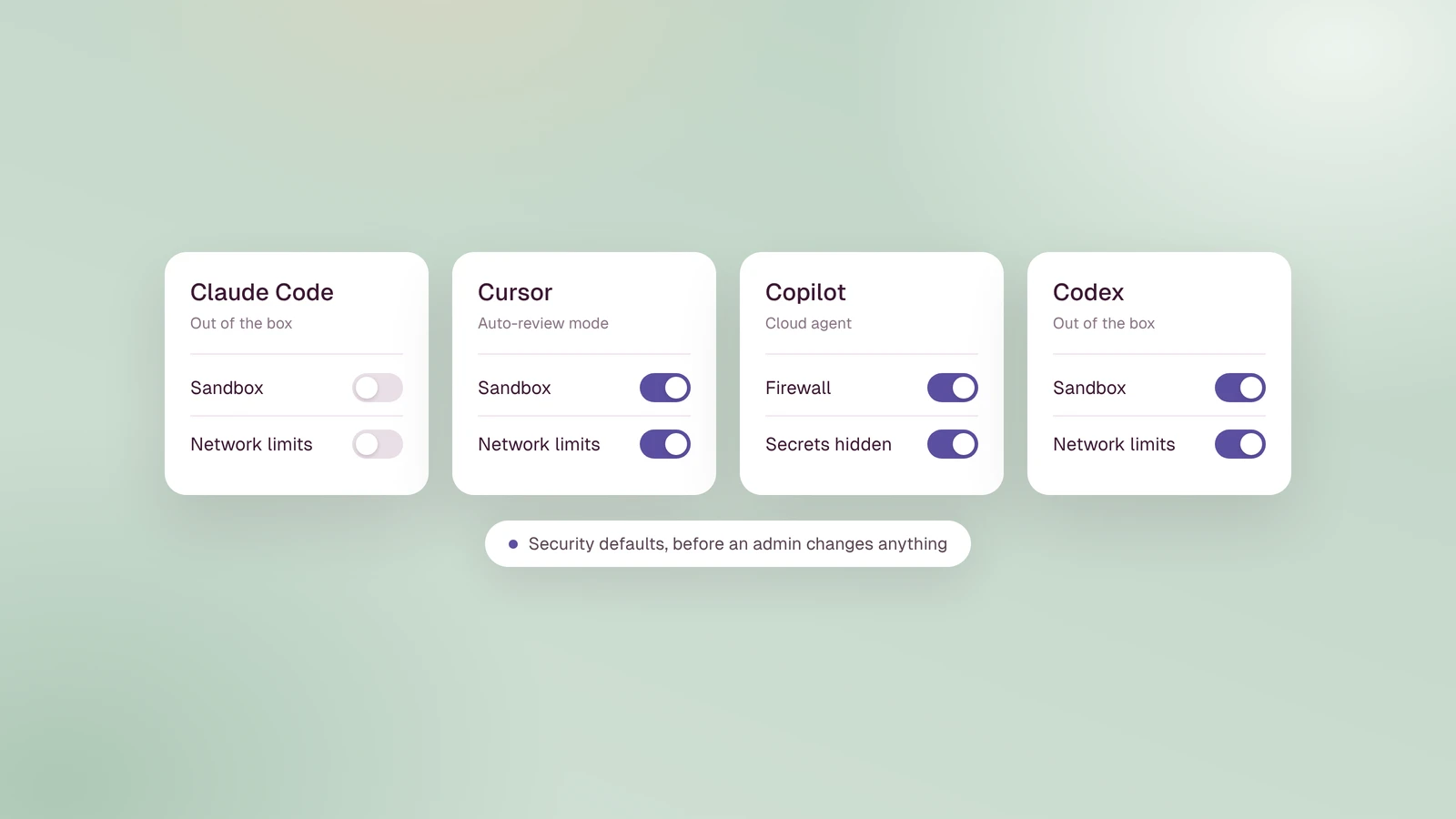
No single AI coding tool has the best security features across the board. Codex is the most locked down by default, with a sandbox and no network access out of the box.
Claude Code gives admins the most detailed central controls, but its sandbox is opt-in.
GitHub Copilot's cloud agent ships with a firewall and no access to your Actions secrets, and Cursor sandboxes commands in its recommended Auto-review mode.
The defaults matter more than the feature list, because most developers never change them.
This comparison covers admin controls, approvals, sandboxing, network access, extensions, secrets and audit logs for Claude Code, Cursor, GitHub Copilot and Codex, based on each vendor's documentation in November 2026.
How do Claude Code, Cursor, Copilot and Codex compare on security?
All four tools now offer central admin controls, some form of command approval, a way to limit network access and a way to manage extensions such as MCP servers.
They differ in what's on by default, which plan you need, and how far an admin can lock settings so developers can't loosen them.
A few differences stand out once you read the docs side by side:
- Sandboxing. Codex runs commands in a sandbox with network access turned off by default. In Claude Code, "The sandbox is off by default", and native Windows runs commands unsandboxed. Cursor sandboxes shell commands in Auto-review mode, but not in Run Everything.
- Default approvals. Claude Code now starts interactive sessions in auto mode, where a classifier reviews actions instead of the developer. Cursor made its classifier-based Auto-review the recommended default in May, and its own docs say "Auto-review is not a security boundary." Copilot's agent mode in VS Code asks you to approve commands before they run.
- Cloud agents. Codex cloud blocks internet access during the agent phase by default. Copilot's cloud agent runs behind a firewall with a recommended allowlist. Cursor's Cloud Agents have internet access by default, and Enterprise admins can lock the network policy.
- Admin lockdown. Claude Code and Codex both read admin-enforced settings from a system file or MDM profile that local config can't override. Several of Cursor's strongest controls, including org-wide sandbox enforcement and audit logs, are Enterprise-only.
Which settings matter most for security?
Feature lists blur together, so it helps to sort controls by what they protect against. For a team rolling out coding agents, these are the settings that change outcomes:
- Who can loosen the settings. A sandbox or allowlist only helps if a developer can't switch it off. Check whether the tool supports admin-enforced settings, and on which plan.
- What runs without a person approving it. Auto-approval modes and classifiers save time, but they make a different decision than a person reviewing each command. Know which mode your developers actually use.
- What the agent can reach on the network. Network access is how injected instructions turn into stolen data. Default-deny with an allowlist is the safer starting point.
- Which extensions can load. MCP servers, plugins and mods run with the agent's access. An admin allowlist turns "any server a developer finds" into "the servers we've reviewed."
- What secrets the agent can see. Environment variables, config files and CI secrets are the usual targets, as the Claude Code mods and agent config leaks this year showed.
Which AI coding tool is most secure by default?
On defaults alone, Codex is the most conservative. It sandboxes commands, keeps local network access off, asks before reaching outside the workspace or the network, and blocks internet access in cloud tasks unless you allow it.
OpenAI's managed configuration lets admins set hard limits in a requirements file that developers can't weaken locally.
Copilot's cloud agent is also conservative where it runs on GitHub. Its firewall is on by default, it can't read your Actions, Codespaces or Dependabot secrets, and by default GitHub Actions workflows don't run on its pull requests until a person approves them.
Claude Code is the most configurable for admins. Managed settings can restrict permission rules, hooks, MCP servers, plugin marketplaces and mods, and can disable bypass mode.
Its defaults rely more on the auto mode classifier and less on isolation, so the sandbox is worth turning on. Cursor sits in between, with a sandboxed recommended mode on the desktop and more open defaults for Cloud Agents.
What did the Cursor extension compromise show?
Settings only protect you if the tool itself is trustworthy. In November, Cursor traced an October marketplace incident to an access key it had issued to Fireworks AI, which Fireworks exposed. Attackers used it to place a trojanized Claude Code extension on Cursor's marketplace.
Cursor said at most 5,000 users may have received it over about 11 hours. The lesson for teams: extensions, plugins and MCP servers are part of your software supply chain, and the AI toolchain is now a target in its own right.
- Restrict extensions and MCP servers to an admin-approved list where the tool supports it.
- Turn off automatic extension updates on machines with production access, or add a delay.
- Keep long-lived credentials out of agent environments, so a bad extension has less to steal.
We cover the MCP side in our MCP server security checklist.
Are tool settings enough to secure AI-written code?
No. Every control in the table limits what an agent can do while it works. None of them checks whether the code the agent wrote is safe.
A sandboxed, firewalled agent with a perfect allowlist can still write an endpoint that skips an access check, and that's one of the most common flaws in AI-written code.
Settings also drift. Teams run more than one tool, developers switch modes to get unstuck, and new machines start unmanaged.
Even the vendors' own docs note limits: Copilot's MCP allowlist doesn't cover servers defined in custom agent profiles, and Cursor's audit logs don't record prompts or generated code.
That's why the last layer should sit where every tool's output meets: the pull request. A security review there covers code from all four tools the same way, whatever settings each developer had on. We cover the policy side in more depth in our checklist for enforcing security policies on AI coding agents.
How does Dam Secure fit alongside your coding tools?
Dam Secure works across whichever agents your team uses, so you don't need a separate security setup for each one.
PR Security Reviews check every pull request against how your codebase actually works, whether it came from Claude Code, Cursor, Copilot, Codex or a person. Findings land on the PR in under two minutes with a suggested fix, and they sync to Linear and Slack.
Managed Security Context writes security context for your codebase in the formats each tool already reads: skills for Claude Code, rules files for Cursor, AGENTS.md for Codex and instructions for GitHub Copilot.
It's generated from your codebase and the vulnerabilities you've already fixed, then raised as a PR for your team to review, so every agent starts from the same standards.
 dam-securebotreviewed in 1m 44s
FAQ
Can a coding tool's extension marketplace be compromised?
Yes. In October 2026, a trojanized Claude Code extension was placed on Cursor's marketplace using an exposed partner access key. Limit extensions to an approved list and avoid automatic updates on sensitive machines.
Which AI code editor has the best security features?
It depends on what you need. Codex has the most locked-down defaults, Claude Code has the most detailed admin controls, Copilot's cloud agent keeps secrets and network access tightly limited, and Cursor's recommended mode sandboxes commands. Check which controls are available on your plan.
Is Claude Code or Codex more secure?
Codex is more restrictive out of the box, with sandboxing and no network access by default. Claude Code offers more central controls for admins, but its sandbox is off until you turn it on. Either can be locked down well with managed settings.
Does Cursor sandbox agent commands?
Yes, in its Auto-review mode, and optionally in Allowlist mode. Commands aren't sandboxed in Run Everything mode, and Enterprise admins can enforce sandbox mode across the org.
Do I still need code review if my coding agent is sandboxed?
Yes. Sandboxing limits what an agent can do while it runs, but it doesn't check the code it writes. A security review on every pull request catches flaws like missing access checks, whichever tool wrote them.
Want to see Dam Secure review your team's PRs? Speak to our team.